
 |
 |
|
 |
 |
|
 |
 |
 |
To create a factorial reliability design, follow the steps outlined next. For more general information on building designs, see Building a New Design.
Choose Home > Insert > Standard Design to add a standard design folio to the current project.

On the Design tab of the folio, select a Design Type from the Screening Designs area in the navigation panel. For example, two level factorial design is selected in the image shown next.

If you wish to rename the folio, click the heading at the very top of the navigation panel (the Experiment1 heading in the above example) and edit the Name field in the input panel.
Define the response(s) for the reliability design. To edit the first response, click Response1 in the navigation panel and then edit its properties in the input panel. To add a response, choose Design > Responses > Add Response.

Note that in order to enable all features specific to R-DOE for a response, you must select Life Data as the response type. (See Adding, Removing and Editing Responses.)
Define the factors. With this design type, you must have at least two factors, and all factors must have two levels. For more information about how the numbers of factors and/or levels affects the number of test runs you can use in the design, see:
Factors are defined in a similar way to defining responses. (See Adding, Removing and Editing Factors.)
Specify additional options by clicking the Additional Settings heading. The available options will vary depending on which design type is currently selected. To see the settings for a particular factorial design type, click a design below.
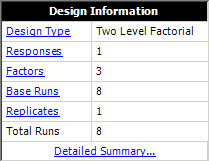
Click Design Summary in the navigation panel to review the properties of your currently configured design. Some of these properties are also listed in the Design Information area on the control panel, and you can access the settings for those properties by clicking the links. (See Design Summary.)
Once you are satisfied with your settings, click the Build icon on the control panel to create the Data tab that contains the test "plan."

© 1992-2019. HBM Prenscia Inc. ALL RIGHTS RESERVED.
 |
E-mail Link |

 Two
Level Factorial
Two
Level Factorial to see the
alias table for the selected Taguchi design type. The
table shows what aliases result from assigning factors
to particular columns in the orthogonal array.
to see the
alias table for the selected Taguchi design type. The
table shows what aliases result from assigning factors
to particular columns in the orthogonal array.