
 |
Related Topics: |  |
 |
 |
|
 |
 |
 |
The Select Existing Utility enables users to reuse text from existing description and status fields in action, customer support, failure analysis, project, incident and problem records. This can help to save time on data entry, ensure consistency and facilitate brainstorming.
When the description or status is a configurable detail field, you can choose whether the feature will be available for that particular field. You can also choose which users will be able to access the utility when it is available.
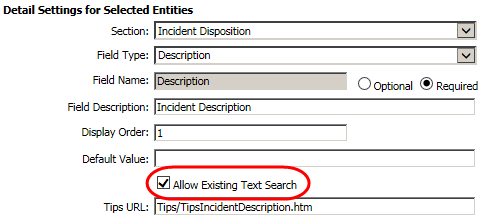
When you create or modify a description or status field in the Details page (Admin > Configure > Details), select the Allow Existing Text Search check box to enable the feature for that field. It will be visible only to uses who have the "Details - Allow Existing Text Search" permission.
When you create or modify a user account in the Users page (Admin > Configure > Security > Users), set the following permissions to specify whether the user can access the utility when it is available.
This permission applies for detail field in any record type. This includes all of the description and status fields in incidents and problems, as well as any relevant configurable details in actions, CSIs, failure analysis reports and projects.
Details - Allow Existing Text Search
These permissions apply for description and status fields that are built-in for a specific record type (e.g., action descriptions, failure analysis visual inspection, etc.).
Action - Allow Existing Text Search
CSI - Allow Existing Text Search
Failure Analysis - Allow Existing Text Search
Project - Allow Existing Text Search
© 1992-2018. HBM Prenscia Inc. ALL RIGHTS RESERVED.
 |
E-mail Link |